
Attachtable
Questions answered by this recipe
- How can I rename attachments?
- How can I delete attachments?
- If I've deleted an attachment, how can I restore it or view it?
- How can I make
(:attachlist:)look prettier and provide more information? - How can I find orphaned attachments or attachments that are linked to but don't exist?
- How can I find out more information about attached files?
Description
By default, renaming or deleting attached files isn't possible from within PmWiki. This recipe adds that functionality, as well as an undelete action, and a modified list of attachments to provide easy links to using these actions. A few extra bells and whistles are also provided, such as extended metadata about attached files.
To install this recipe
- download attachtable-2026-09-14.zipΔ
- The files in
cookbook/attachtable/should go to a new directoryattachtableunder yourcookbookdirectory - The files in
pub/attachtable/should go to a new directoryattachtableunder yourpubdirectory, or another location that you should define as$AttachtablePubDirUrl
- The files in
- Add the following to your configuration file (after having set
$EnableUploadto true):switch($action) { case 'delattach': case 'renameattach': case 'downloaddeleted': include_once("$FarmD/cookbook/attachtable/attachtable-actions.php"); break; case 'fileinfo': case 'thumbnail': include_once("$FarmD/cookbook/attachtable/fileinfo.php"); break; case 'upload': default: include_once("$FarmD/cookbook/attachtable/attachtable.php"); break; } - Edit your Site.UploadQuickReference page and replace
(:attachlist:)with(:attachtable:)
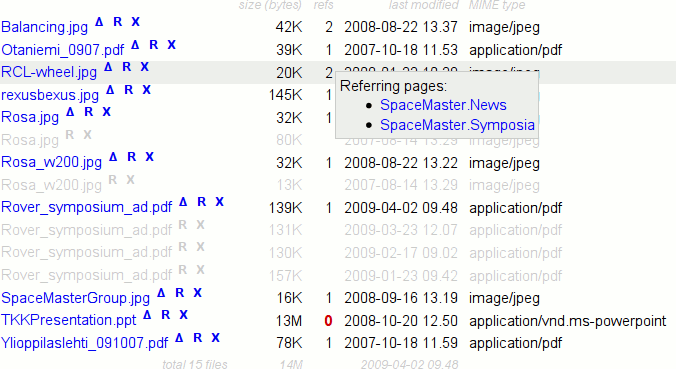
Screenshot using (:attachtable:) with default settings in the default skin
Usage
The default use case of Attachtable is as a replacement for (:attachlist:) in Site.UploadQuickReference, a page that is displayed when viewing the attachments associated with a page. Additionally it may of course be used to list attached files on other pages.
The directive (:attachtable:) accepts the same parameters as (:attachlist:) does, as well as some others, and generates a table rather than a list of attached files. It also has additional action links to delete ( X ) and rename/restore ( R ) files. Hover over the links for their tooltip explanations. These links are only visible if you have the required level of authorization (or have set otherwise, see below).
By default, Attachtable actions require 'upload' authorization, except for deleting files from disk, which requires 'attr' authorization. Authorization levels are customizable for all actions. (see PmWiki.PasswordsAdmin for more on authorization levels)
- Deleting attachments - linked as X
- If
$EnableUploadVersionsis set, deleting a file will first rename it to have a different extension (filename.ext,timestamp). Deleting such a "deleted" file will remove it from disk; this is confirmed using JavaScript, as it can't be undone. - Renaming & restoring attachments - linked as R
- For the interactive prompt, you'll need to have JavaScript enabled (and not have
$EnableAttachtableRename
Viewing deleted files directly is also possible, with the proper MIME type and even if $EnableDirectDownload is set off.
(:attachtable:) optional parameters
(:attachtable:) shows a tabular list of attachments of the current group or page, depending on whether attachments are organised per group or per page. It accepts the same optional parameters as (:attachlist:) as well as some additional ones:
(:attachtable NAME:)- Shows the attachments of the group or page NAME.
(:attachtable *:)- Shows the uploads directory and permits browsing of all uploaded files by directory if
$EnableDirectDownloadis not set to 0. (:attachtable ext=xxx:)- Specifies an extension for filtering by type of file. To list multiple extensions, use
ext='xt1 xt2'orext=xt1,xt2. Attachtable'sextoption will also list deleted files of the specified type, unlike(:attachlist:). (:attachtable filter=xxx:)- Specifies a more advanced file name filter, where
xxxcan be a valid regular expression pattern (use separator / to include, ! to exclude) or a set of comma-separated wildcard patterns. Internally, this and theextparameter use the MatchPageNames function. (:attachtable data=default|all|none|fileinfo|name|size|references|modtime|mimetype|filetype:)- Select which data fields to show in the table.
- Leaving this out or setting
data=defaultwill let$AttachtableDataFields data=allwill show all fields.data=noneonly shows the file names.- Any combination of the other values will show those fields in the order specified, eg.
data=mimetype,sizewill show the file names, then the MIME type and third the file sizes.fileinfo- Link to extended information about the file (requires$EnableAttachtableFileInfoname- File name (if not included, will be shown before other fields)size- File size in bytesreferences- A count of the references made to this attachment, hover over the number for links to the referring pagesmodtime- Time when file contents were last modified. Due to the way attachments are handled in PmWiki, this is synonymous with the time when this version of this file was uploaded.mimetype- The MIME type of the file contents, if supported by your PHP enginefiletype- An expanded description of the file, if supported by your PHP engine. Note that this may be a bit slow for large numbers of files.
- Leaving this out or setting
(:attachtable show=default|all|header|normal|deleted|linkonly|footer:)- Select which sections to show in the table.
- Leaving this out or setting
show=defaultwill let$AttachtableShowRows show=allwill show all sections.- Any combination of the other values will show the specified sections, eg.
show=header,footer,normalwill show the header row, followed by normal files and the footer.header- Column titlesnormal- Normal filesdeleted- Deleted fileslinkonly- Missing files — this requires the references column to be visiblefooter- Total number and size of listed files
- Leaving this out or setting
(:attachtable actions=default|all|none:)- Show or hide the actions associated with the attachments.
- Leaving this out or setting
actions=defaultwill only show the actions that the user currently has permissions for. - Setting
actions=allwon't circumvent the permissions required for the actions, it'll just show the links. actions=nonewill hide all the actions.
- Leaving this out or setting
(:attachtable -sortable:)- Disable the JavaScript re-sortability for the table. See below for more information.
- Note: Table re-sorting (by clicking "size" header column) works correctly only for
$AttachtablePrettyFilesize= 0config.php)
- Note: Table re-sorting (by clicking "size" header column) works correctly only for
(:attachtable sort=name|ascendingname|descendingname|time|date|descendingtime|descendingdate|size|ascendingsize|descendingsize:)- Default sorting of table on page load.
- Inspired by AttachListSort. (--SlavomirD)
- Option (sort=xxx) is not related to (-sortable) option, because (sort=xxx) just initialy sorts the table on page load.
Configuration
The following variables may be set in your config file to control the way Attachtable works.
$AttachtablePubDirUrl- default:
$PubDirUrl/attachtable
The URL for the directory containing the JavaScript and CSS files used by the recipe. $AttachtableCSS- default:
$AttachtablePubDirUrl/attachtable.css
The URL of Attachtable's required CSS styles. If set toFALSEorNULL, no CSS is included. $EnableAttachtableSortable- default:
FALSE
Set toTRUEto include an optional Javascript addition that will let you re-sort the attachments without reloading the page. To use, click on a data column header. See below for more information. $EnableAttachtableFileInfo- default:
FALSE
Set toTRUEto include a link to additional file information. See below for more information. $HandleAutharray entries- See the source code for the different
$HandleAuthdefinitions and set them to override the default authorization levels, for example with$HandleAuth['delattach'] = 'attr';
These also define the visibility of the action links in the attachtable. Note that if$EnableUploadVersionsis not set, deleting a file requires that$HandleAuth['deldelattach']$AttachtablePrettyFilesize- default:
1
Controls the file size display, set to0for the raw byte counts (also shown in the tooltip), set 1 for SI units, set 2 for IEC binary multiple units. $AttachtableLogFmt- default:
undefined
An array in the format of$RecentChangesFmtthat, if set, can add entries in your RecentChanges pages for file deletions and renames. Since logging file uploads isn't handled by Attachtable, also using Cookbook.RecentUploadsLog or something similar is recommended. The variables$upnameand$upreportmay be used in the log template; see the source code for an example. $AttachtableDataFields- default:
array( 'fileinfo', 'name', 'size', 'references', 'modtime', 'mimetype' )
The data fields to display when not specified by(:attachtable data=xxx:), see the directive documentation above for more information. $AttachtableShowRows- default:
array( 'header', 'normal', 'deleted', 'linkonly', 'footer' )
The sections of the table to display when not specified by(:attachtable show=xxx:), see the directive documentation above for more information. $AttachtableDefaultFilter- default:
undefined
The default filter to use if not specified by(:attachtable filter=xxx:), see the directive documentation above for more information. $AttachtableProperReferenceLookupMaxPages- default:
8
The maximum number of pages to parse properly when looking up attachment references, see below for more information. $AttachtableReferenceListPatterns- An array of rules to include or exclude pages when looking up attachment references, see below for more information.
$FileInfoThumbnailFmt- default:
undefined
An array of regular expression'/pattern/' => 'replacement'rules for finding the thumbnail of a file. If the resulting string has a / as the first character, it is interpreted as a regular expression for matching file names. See below for examples. $FileInfoLogFmt- default:
undefined
An array of'pagename' => 'pattern'rules for reading RecentUploadsLog or other log files of attachment changes. See below for examples.
Actions
If you'd rather use the actions directly, the format is as follows.
?action=delattach&upname=filenamefilenameis deleted from disk or renamed tofilename,timestamp, depending on$EnableUploadVersionsand whether it's already marked as deleted?action=renameattach&upname=filename&newname=newfilenamefilenameis renamed tonewfilename?action=downloaddeleted&upname=filename,timestampfilename,timestamp, a deleted or overwritten file, is displayed with the correct MIME type?action=fileinfo&upname=filename- Show extended information about
filename ?action=thumbnail&upname=filename- Provided that
filenameis a JPEG image that contains a thumbnail image, show that thumbnail
Previous versions
- Download attachtable.tar.gzΔ (142kB)(for older PmWiki versions) or attachtable-2023-02-21.zipΔ (for PHP 5.5 and PmWiki 2.2.58 or newer) and unpack it:
Download attachtable-getid3-more.tar.gzΔ (127kB) and unpack it to the directoryattachtable/getid3under your cookbook directory. The recipe unfortunately has to be separated into two files due to pmwiki.org's 150kB limit on uploaded files (the included GetID3 library has a large number of modules for different file types). Alternatively, the whole package is available as a zip file from http://autsys.tkk.fi/pub/pmwiki/attachtable-2009-05-31.zip (306kB). For a "lite" version, you may download just attachtable.tar.gzΔ and not include thegetid3directory.- As of version 2017-07-07, this is no longer needed, the archive attachtable-php74.zip contains all files as I've increased the limit on uploads. (--Petko)
- Previous version attachtable-php74.zipΔ.
Notes
For full functionality, you'll need to have $EnableUploadVersions set on (not set by default). To do so, add the following to your configuration file: $EnableUploadVersions=1;
By default, Attachtable may relax your security settings slightly, as 'upload' access will now also grant read access to overwritten files, which access is not granted in a default PmWiki if $EnableDirectDownload is set to 0. If this is a concern, change the $HandleAuth definition for 'delattach' to whatever you need. 'attr' access will also grant permission to delete attached files from disk when using Attachtable.
Attachtable's file restoration depends on PmWiki's versioning of overwritten files, where the file is renamed to "$filename,$Now" where $Now is a unix timestamp: an integer number of seconds since 1970. If you've changed some part of how PmWiki handles this, Attachtable may not work. Also important is the MakeUploadName function in upload.php, which by default strips commas from uploaded files and hence prevents naming uploads in a way that matches the pattern of a deleted file.
The rename/restore prompt and the deletion confirmation are done using JavaScript, but the actions themselves don't require it. Without JavaScript, the restore link will try to restore the file to its original name.
File verification when renaming files doesn't use the $UploadVerifyFunctionUploadVerifyRename that's based on the default UploadVerifyBasic function defined in upload.php.
Provided that $EnableDirectDownload is not set to 0, directories may show up in (:attachtable:) output, if using the * parameter or if directories exist in the uploads/NAME directory. Attachtable actions won't work on directories.
The file MIME types are found using a relatively robust process: first we try to use either mime_content_type or finfo_file; if these don't produce a decent result we try the shell command 'file -bi filename' and if that doesn't work we look up the extension in the $UploadExts array. Extended file information uses the shell command 'file -b filename'. I'm unable to test this on a non-Linux machine so I don't know if or how it'll fail in, say, a Windows server environment.
The output of Attachtable is fully internationalizable using the $XL array. To do so, you'll need to fill in the values to this XLPage templateΔ and add it to your common XLPage or otherwise include it.
FileInfo
The FileInfo component of Attachtable makes use of a patched version of the getID3() library that's included with the recipe. This allows most media files to be mined for all available meta information. Some additional functions are included for displaying image information, not the least of which is the ability to read embedded thumbnails from JPEG images.
FileInfo may also look for image thumbnails based on the file name, but for that you'll need to define a regular expression pattern and replacement to map a filename to its thumbnail. In my own setup, I generate a thumbnail for each uploaded image such that eg. filename.png has a thumbnail at filename.small.png. The rules I use to find these thumbnails with FileInfo are as follows:
$FileInfoThumbnailFmt = array(
  '/^(.+?)(\.small)?\.(gif|jpg|png)$/i' => '$1.small.$3',
  '/^(.+?)(\.small)?\.\w+$/i' => '$1.small.png'
);
Alternatively, I believe the following should work for ThumbList thumbnails. Note that the generated string is itself a regular expression, which is then matched against all files in the directory.
$FileInfoThumbnailFmt = array( '/^.*$/' => '/th\d+---([0-9a-f]+--)?$0/' );
FileInfo can also read the log files generated by eg. RecentUploadsLog. The following should work with the default format. $upname is replaced with the filename, the first parenthesized subpattern is taken to be the time and the second the action that took place.
$FileInfoLogFmt = array(
  '$Group.RecentUploads' => '.*\)$upname\]\]  \. \. \. (.*?) by (.*)' );
sortable.js
The optional Javascript re-sorting uses a slightly modified copy of Joost de Valk's implementation. The main changes have been to streamline the code and to add a custom sortval= property to the sorted table cells (used for the file size and last-modified date). This does break the resulting HTML's validation but should do so in a completely safe manner.
To use sortable.js elsewhere on your site, you'll need to include the script where appropriate and give the class 'sortable' to any table that you wish to become sortable. Currently this version of sortable.js is not compatible with the separate cookbook recipe SortableTables.
References
To find and list references to attached files, Attachtable needs to parse through pages in your wiki. By default, this is limited to the pages in the same group, as the process is relatively slow. For the same reason, there is a further limit $AttachtableProperReferenceLookupMaxPages$AttachtableProperReferenceLookupMaxPages
To let Attachtable look through all wiki pages, you may set the following in a config file:
$AttachtableReferenceListPatterns['limit'] = '';
If the reference lookup seems too slow or Attachtable appear to get stuck, you might try setting the following in a config file:
$AttachtableProperReferenceLookupMaxPages = 0;
Features under consideration
- non-JavaScript file rename prompt
- remap links on wiki pages when renaming a file
- PITS 00331 display number of attachments for a page
- PITS 00659 enhanced Attach button
Release Notes
- 2026-09-14 S Davis remove warning from call to deprecated finfo_close, tidy size column heading, fix SI units
- 2025-09-09 Petko per S Davis update JavaScript for unicode
- 2025-01-22 S Davis change
($pg)to]if (! is_array ($pg)) continue; if (! array_key_exists ('text', $pg)) continue;to fix PHP 8 warning - 2023-02-21: update for PHP 8.2, reported by Luigi (by Petko).
- 2021-06-26: (php74) fix warning, initial sort case insensitive
- 2021-03-06:
- (php72) Table default sorting option added (sort=name|descendingname|date|descendingdate|size|descendingsize|etc...) (by SlavomirD)
- (php72) bugfix: Table header onClick sorting by "size" sorts alphabethicaly (thus "3,911" bytes is greater than "199,756" bytes) - fixed by leftpadding by SPACES (by SlavomirD)
- 2018-06-19: Update for PHP 7.2, should also work with earlier PHP versions (by Petko)
- 2017-07-07: Fix infinite loop when a page contains the attachtable directive for groups with less than 8 pages (by Petko)
- 2014-12-10: attachtable-php55.zipΔ for PHP 5.5 compatibility, needs PmWiki 2.2.58 or newer. Revision by HansB
- 2009-05-31Δ
- bugfixes: exec(), captioned links
- 2009-04-28Δ
- bugfix:
$AttachtableCSS
- bugfix:
- 2009-04-27Δ
- second file: attachtable-getid3-more-2009-04-27.tar.gzΔ
- alternative: http://autsys.tkk.fi/pub/pmwiki/attachtable-2009-04-27.zip
- new: FileInfo + thumbnails
- separated into multiple files & packed as archive
- various bugfixes
- 2009-04-20Δ
- new: internationalization
- new: javascript re-sorting
- bugfix: fleeting PHP errors on redirect pages due to empty
$AttachtableLogFmt - bugfix: table now shown even if no attachments in order to show missing files (reported by Karl Schilke)
- prettier CSS & Javascript
- 2009-04-17Δ
- new: can log changes to RecentChanges pages
- new: filter & show parameters (filtering suggested by Petko)
- new: references & filetype data columns
- new: linkonly section & footer row
- new: "human-readable" filesize (suggested by overtones99)
- bugfix: ppt & xls mime type correction
- bugfix: auth settings
- mime type shown by default
- rm '-deleted' listing option (now show=...)
- 2007-11-28-2Δ
- external file check for Petko's skip
- bugfix: -titlerow parameter now actually works
- 2007-11-28
- MIME types
- rearrange columns
- view deleted files
- properly read authorization levels for action link display
- no
$EnableUploadOverwritedependency
- 2007-11-27
- verify on rename
- globals to disable parts
- optional direct links to deleted files
- handle directories better
- 2007-11-26
- file rename action
- internal reworking
- simplify: more parameters & no globals
- 2007-11-25 - answering Petko's suggestions
- by default, only show permitted actions
- delete from disk
- superscripted restore link
- minor cleanup & bugfixes
- 2007-11-24 - first release
See Also
- PmWiki.UploadsAdmin Administration of PmWiki uploads
- PmWiki.UploadVariables Variables used for uploads/attachments
- Cookbook.AttachDelete An enhancement to the current upload feature to allow the deletion of uploaded files.
- Cookbook.AttachListSort Sort an attachlist
- Cookbook.FileList Tabulated filelist markup as alternative to
(:attachlist:), for a simple, easy readable look. - Cookbook.MultiUpload Upload multiple files at once by packing them in a zip archive & extracting them on the server
- Cookbook.RecentUploadsLog List all uploaded files in RecentUploads pages
- PITS 00273 Refcount for attachments
- PITS 00598 add possibility to delete attachments
- PITS 00665 Allow customization of attachlist output
Contributors
Comments
User notes +9: If you use, used or reviewed this recipe, you can add your name. These statistics appear in the Cookbook listings and will help newcomers browsing through the wiki.