
ImagesAutoResizing
Goal
When loading an image, create a smaller image on the page, with a link to a larger image.
Solution
The Minimage module : Please report any problem in the discussion paragraph below or by mail.
- minimage.zipΔ script and attached documentation.
Add the following line to local/config.php
include_once('cookbook/minimage.php');
Notes
- July 2016: Update after ten years to fix problem with PHP 5.5 (related to UTF-8 encoding)
- This recipe was last tested on PmWiki version: 2.2.71
- Needs the GD library (V 2.03+) to be installed on the server
- php code size: 16 ko, around 50% of that code being parsed every time, the remaining only when uploading image.
Usage
Set Img:image.ext anywhere in your page
As example :
Img:myimage.jpg
If default dimensions are not ok for you, you can impose the dimensions by setting Img:small_size*plain_size*image.ext. As example:
Img:150*800*otherimage.gif
Note: the use of '.' as separator for size characterization is no longer accepted. You should remove it to still have working links. - Sorry for that, see the discussion for explanation -
Image type is limited to jpeg, gif and png. When clicking on the Img call, a screen will open to invite you to upload your image and create or modify IPTC tags.
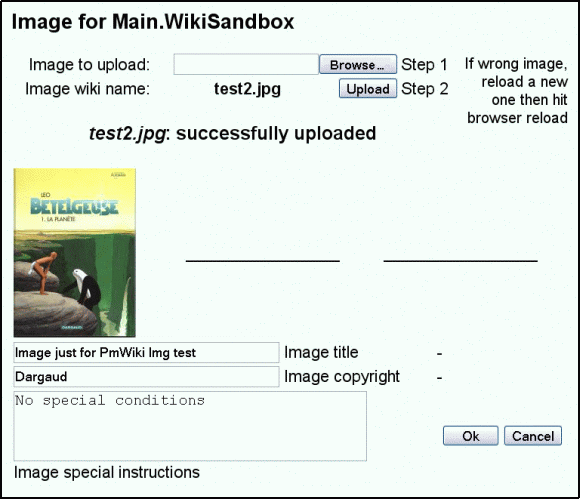 |
After validating the input, the images are resized and stored on the harddrive.
To force resizing of an existing image, use a leading star (*), which should be removed later:
Img:*220*1024*myimage.jpg
If the small image is of same size as the plain image, there will be no link to the plain image. So by example :
Img:350*350*AnImage.jpg
will simply display the image with a dimension of 350 pixels.
There is no size limitation (but your server probably have limitations), but wrong files will be automatically deleted, and too large source images will be resized.
This script do not resize images lower than (1.15 * required size) -to limit quality loss when image is slightly larger than required. This coefficient can be modified (parameter $OverSize).
You can also load images by FTP. They will be resized at first display. In that case, the IPTC tags will be the defaults for caption and special instructions, and the copyright owner will be the first one to display the images... (read on the author cookie). For files loaded via FTP, image extension shall be in lower case.
- Small image is stored as image.s.ext (displayed on page)
- Plain image is stored as image.p.ext (small image link to this one)
- Archive image is stored as image.ext (not displayed)
If plain image is of same size as the archive image, the archive will be automatically deleted.
This archive image can be simply displayed with an Attach:image.ext.
It have a maximum size and will be resized if exceeding this maximum. If you want to remove the archive files, set the maximum archive size identical to the plain displaying size.
Configuration
On PmWiki2 only. Need to have the GD library installed in a version above 2.03 (to allow image resampling). This library is part of the PHP distribution but not always installed, because it is delicate to install, and also use significant server resources. If resizing not possible, a message will be displayed.
Needs to have PmWiki uploads enabled. The password is the upload password. Storage directory is the same as for upload.
   #$WriteGif=FALSE; // Force inactivation of Gif writing
   #                 (default TRUE, but check function existence)
   #$DispIPTC=FALSE; // Stop interactive IPTC input (default TRUE)
   $img_smallsize = value; //Larger size of displayed image,default 256
   $img_plainsize = value; //Larger size of linked image, default 768
   $img_archsize = value; //Max size of archive on drive, default 1280
   ## Setting archive size equal to linked size remove archive files
   #$OverSize = value;//extra size which do not allow resizing,default 1.15
   ## Default IPTC tags (jpeg images only)
   $def_iptc_caption = 'text';
   # if no caption tag exist, default 'Image collected on a PmWiki'
   $def_iptc_copyright = 'text';
   # if no copyright tag exists and no Author defined, default empty
   $def_iptc_special = 'text';
   # *appended* to existing special instruction tag, default empty.
   # Maybe used to defined a site licence (cc or artistic or whatever).
When interactive IPTC tags are unactivated, parametered values are used, and the Author (as defined in the cookie) is set as copyright owner, if no default author set. To unactivate author setting, set a '-' or any char as default author.
Translations
The strings to be translated are defined in the PmWiki.XLPageCookbookTemplate page, which is used to create any local XLPageCookbook page.
Done :
Explanation and user documentation :
See also this page translated :
Limitations
- I have not been able to rewrite IPTC tags on an image which already have these tags. So in that case, tags are left 'as is'.
I have no idea of what is wrong, so for people who are able to understand these sort of things, here are links to the php source code for function iptcembed() :
- www.koders.com
- lxr.php.net
If someone knowledgeable can have a look... - Even if the creation of gif images is said to work on your server, this may be not the case. On my webhost, that drive to an internal server error.
To force inactivation of gif writing, set$WriteGif=FALSE; - If gif creation is not allowed the script create jpeg images with extension '.gif' (say, the internal format -jpeg- is not the one said by the extension -gif-).
This is not quite neat but is handled properly on most browsers. - This PHP add-on creates images. On some hosts, you may not be able to remove by FTP these PHP created files. See the cookbook PHP Files Management to solve the problem.
License
GPL
Release history
- 27 nov. 2004 V0.1 - 1rst issue - This is my very first php script, and what a fight! Also, that was not the easiest to begin with...
- 28 nov. 2004 V0.2 - Solved problem with pages containing accented letters.
- 29 nov. 2004 V0.3 - Solved problem with .jpeg extension. Allow uppercase file extension (but stored on drive as lowercase)
- 1 dec. 2004 V0.4 - Cosmetic - Added parameter
$WriteGifto block gif writing. Added$DispIPTCto allow/block interactive input of IPTC parameters. - 26 dec. 2004 V0.5 - Corrected to work with PmWiki 2.0Beta10 and over
- 8 jan. 2005 V1.0 - Working thumb reload - parameter
$OverSize - 16 jan. 2005 Added user documentation page in zip file
- 16 jan. 2005 V1.1 - removed glob() function, not existing on all servers
- 30 jan. 2005 V1.2 - added possibility to force dimensions
- 31 jan. 2005 V1.3 - serious code cleaning, added upload log in file (All)RecentUploads.
- 04 feb. 2005 V1.4 - allow mixed lower/uppercase in file extension.
- 13 feb. 2005 V1.5 - no link to image which have the same dimension - Can now force resizing of an existing image.
- 13 feb. 2005 V1.6 - bug release on one parameter upload
- 24 apr. 2005 V1.7 - display IPTC parameters with plain image
- 16 may 2005 V1.8 - correction htmlentities on displayed text (accented chars)
- 31 oct 2005 V1.9 - now display in IE images with names having accented chars -
$EnableDirectDownloads=0; is now valid (thanks to Bill Wraith). - 1 Nov 2005 V2.0 - now display upload thumb in indirect download
- 10 Dec 2006 V2.1 - can upload to other directory, remove actions in screens
- 2016 V2.2 - fix problems with PHP 5.5
Contributor
Comments
See discussion at ImagesAutoResizing-Talk
User notes +1: If you use, used or reviewed this recipe, you can add your name. These statistics appear in the Cookbook listings and will help newcomers browsing through the wiki.