
PageFeed
Question
How can I create an RSS feed from a wiki page's history?
Answer
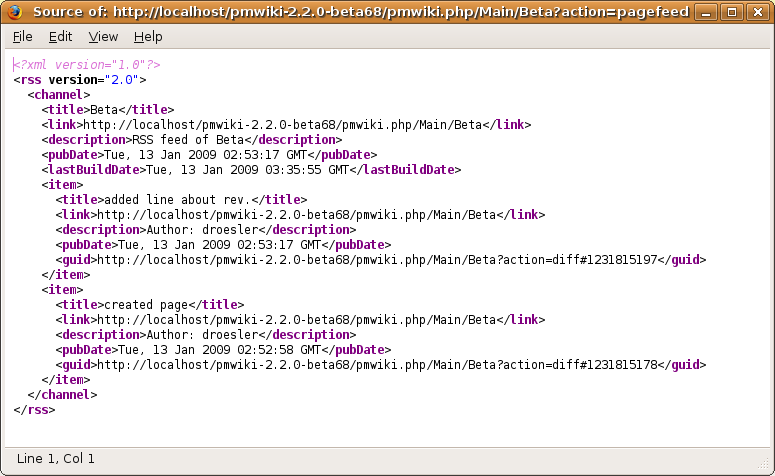
PageFeed will create an RSS xml web feed from a selected page's history. All you need to do is install this recipe and call the 'pagefeed' action (i.e. ?action=pagefeed).
Installation
To enable PageFeed, save pagefeed.phpΔ in your cookbook folder, and include the following line in your config.php:
include_once("$FarmD/cookbook/pagefeed.php");
Use
PageFeed is a recipe for PmWiki that creates an RSS feed from a single wiki page's history, where each edit is an entry in the feed. The resulting RSS feed can be called by using ?action=pagefeed (i.e. http://example.com/pmwiki.php?n=Main.HomePage&action=pagefeed or http://example.com/pmwiki.php/Main/HomePage?action=pagefeed if you have $EnablePathInfo=1)
To enable the feed on all pages of a group you can edit the GroupHeader page and add :
%rfloat%[[{$PageUrl}&action=pagefeed|RSS]] or %rfloat%[[{$PageUrl}&action=pagefeed|Path:/wiki/pub/logos/rss_logo_small.png]]
Feed Link
By default, PageFeed adds a title link in the page's header. This option can be disabled by setting the Taken out of release 2009-04-11
$PageFeedLink variable to 0 in your config.php file (i.e. $PageFeedLink = 0;).
Count Option
You can define how many items are in the feed (default is 25) by adding &count=n to the url, where n is the number of items you want to appear. (i.e. http://example.com/pmwiki.php?n=Main.HomePage&action=pagefeed&count=10 will only show the 10 most recent history items)
Minor Edit Display
You can choose to not include minor edits in the page feed by turing the minor option to 0 in the feed url. By default, PageFeed displays all edits. (i.e. http://example.com/pmwiki.php?n=Main.HomePage&action=pagefeed&minor=0 will only show non-minor edit in the feed)
Format
The format for the feed xml is saved in the template $FeedFmt['pagefeed'] and follows the same formatting guidelines as PmWiki's feeds.php system (see WebFeeds).
Special Variables
There are several special variables you can include to make the PageFeed more dynamic. These can be included in any part of the $PageFeedFmt nested array:
$FeedRSSTime- Most recent edit in standard UTC format$FeedISOTime- Most recent edit in standard ISO time$ItemRSSTime- Time of edit in standard UTC format$ItemAuthor- Author of edit$ItemSummary- Summary of edit$ItemDiff- Raw revision data (not recommended for inclusion)$ItemUnique- Time of edit in Unix format$ItemMinor- "Yes" if edit was minor, "No" if not$ItemHost- IP address of author
You may also use any other PmWiki variables ($FarmD, $pagename, etc.), including Page Variables (i.e. {$PageUrl}, {$Title}, etc.).
For example, each item has a default description of "Edit by: \$ItemAuthor\nMinor: \$ItemMinor"
$FeedFmt['pagefeed']['item']['description'] = "Edit by: \$ItemAuthor\nMinor: \$ItemMinor"
Example

Release Notes
- 2010-03-14: PageFeed 0.6 (fixed bug for minor entries, fixed anchors for edits, fixed repeating last entry bug for short histories, thanks to Thomas)
- 2009-04-11: PageFeed 0.5 (complete rewrite, formatting changed to reflect WebFeeds, removed feed link)
- 2009-02-01: PageFeed 0.3.1 (fixed bug, original page loads if no page history exists)
- 2009-01-27: PageFeed 0.3 (added feed link option)
- 2009-01-16: PageFeed 0.2 (added PmWiki variable support, minor edit removal option)
- 2009-01-12: PageFeed 0.1 (first release)
See Also
Contributors
Comments
See discussion at PageFeed-Talk
User notes : If you use, used or reviewed this recipe, you can add your name. These statistics appear in the Cookbook listings and will help newcomers browsing through the wiki.