
TableEdit
Questions answered by this recipe
How to edit tables more easily.
Description
Interactive table editor.
Installation notes
Download TableEdit.zipΔ The files expands in the appropriate directories from the wiki root directory
As with other addons, to use the cookbook:
tabledit.phpfile shall be in the cookbook directory- write the following in config.php:
To include the GUIedit bar set in the config file:
$EnableGUIButtons = 1;
If you wish to use the larger images of Guiedit32, just set *before* the cookbook inclusion:
$GUIButtonDirUrlFmt = '$FarmPubDirUrl/guiedit32';
The autoinsert version works for 'out of the box' pmwiki version, but for older skins, where there is only one form, if the button inserts the table, but does not autostart the table edit screen, try:
 $TEEditFormNum = 0;
 include_once("cookbook/tabledit.php");
This is related to the fact that on present skins the edit screen has two forms, the first being the top search, the second being the edit itself.
You may also modify that parameter for others skins. 0 is the 1rst form, 1 is the 2nd form, 2 is the 3rd form, etc. you can see that on the javascript code at the bottom of your browser when moving the mouse on the insert table button.
If you wish to use the (highly recommended) SectionEdit recipe, the tabledit inclusion should be set *before* the sectionedit. This is related to the fact that both addons are competing to modify the directive 'include', and the tabledit takes the presence of 'sectionedit' into account when set first (due to the fact that a directive can only be modified one time).
Usage
For inserting table in edit mode, you should first click in the window precisely where you want to set the table.
The editor is only for 'advanced tables', 'simple tables' having no interest for an automated interface. It is also much more flexible.
The tables inside included pages are not editable. They are simply ignored.
You still can modify by 'hand editing' the table and cells parameters. The parameters unknown from the addon are maintained through the edition process.
If the GuiEdit bar is activated, an 'insert table' button is automatically added at the end of the bar. It creates and edit a 3 cols, 2 rows table.
to remove the sign "(Table edit ↓)", write the directive
(:notabledit:)
and the sign shall no longer be displayed after the directive
Site example :
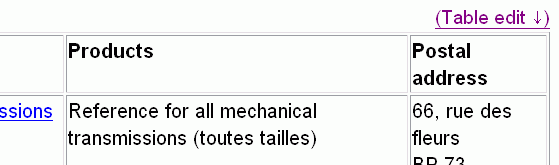
Edit table link automatically created
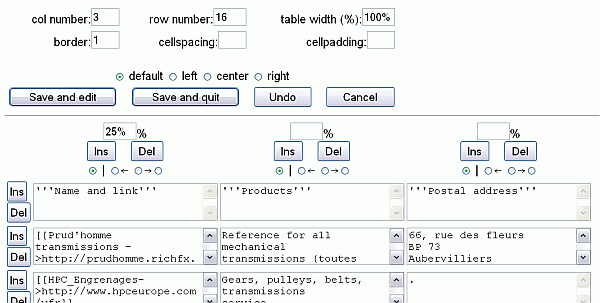
Edit table screen
Release Notes
- V0.1 : First issue - 17 dec 2006
- V0.2 : Flush cache, add form parameter, try avoiding lock when not saving after an autoinsert - 17 dec 2006
- V0.3 : 1est line bug correction, Presentation, by Nick Bell - 8 april 2007
Translation
The cookbook is ready for translation, and specific words have been entered in the XLPageCookbookTemplate. If your wiki is not in english, look if the page XLPageCookbook exists in your language, install it and reference it in the config.php file. If not yet existing in your language, the translation strings are listed in the PmWiki.XLPageCookbookTemplate in the pmwiki site. So help yourself and please also modify the original pmwiki translation page.
Comments
It would also be a good idea to have a simple table to advanced table convertor. If someone fluent in regular expression is volunteering, the result can be incorporated in the cookbook.
In the design of this cookbook, some ideas were kept from 'sectionedit' cookbook and also from 'minimage'.
Arnaud - 04/12/2010 Hello, thank you for this recipe !
I try to combine the two recipes : AdvancedTableDirectives and TableEdit but they don't work together. The recipe I include first in the config.php file is enabled. The other doesn't work.
Example : include_once("cookbook/advancedtabledirectives.php");
include_once("cookbook/tabledit.php"); >> AdvancedTableDirectives is enabled
include_once("cookbook/tabledit.php");
include_once("cookbook/advancedtabledirectives.php"); >> TableEdit is enabled
Thank you in advance
D. Flores - 19-May 2008
Hi there! Very useful addon. Is there any way to adjust the vertical alignment through the TableEdit interface without adding "valign=center" to the markup itself? Also, is entering a period (.) or some other punctuation the best way to display a blank cell with the table directives markup? Thanks!
I have no idea how to setup easily the vertical alignment. The screen is already quite crowded and adding radio buttons in the left margin of lines don't looks a good idea, maybe we can do a general parameter for the whole table as a minimum ?
The display of an empty cell is a generic problem of ie browser in pmwiki. I personnaly use a period. [PRZ]
Davide Andrea April 11th 2008.
Carriage returns in a cell break the table edit function. The table displays fine; but, when you click Table Edit, the form stops at the cell with the carriage returns. If then you save, the rest of the table is lost. To fix a broken table, use the standard page edit function to remove the carriage return characters and save.
This is a basic function, so it is not supposed to do so. There is an exchange procedure which replace carriage return in a cell by \ \, lines 381 and recover in lines 99 to 102. Maybe this is related to some particular configuration ? [PRZ]
Dey - 11th January 2007
First new year greetings and thanks for making this.
My problem has been to do with the simultaneous edits on a table using tableEdit. Somehow the simultaneous edits (by say two people on the same table) are not tracked and people are never informed of any changes being made across each other. Is this a known problem or am I missing some setting?
Greeting to all of you too! This is most probably true considering the way this addon works, but I don't see any simple solution. Having two people on the same table shall normally be not very frequent. For the rest of the page, it is recovered just before table modifications are saved, so normally there shall be no harm when people are working simultaneously on the same page, except if this is on the same table.PRZ
Just tried 1st release and nothing happens - No "edit table" button/link appeared. Is there any special settings needed besides the "include"?
Yes, the button is part of the GuiEdit bar, so the bar shall be activated to get the button PRZ
Is there a way to stop the "(Table edit ↓)" links from appearing above all tables?
Yes, use the directive (:notabledit:) - sorry, that was not documented
I tried also inserting a table with the new "insert table" button, but still didn't see any interactive editing after save...
There are in fact different problems
- You shall use recent pmwiki version, tested with 2.1.26 and 2.2.beta 17, fails with 2.1.5
- Autoclick work only with recent skin version, see explanation above, one solution is proposed in V0.2
- There is some caching and you may not reopen the last saved version, so having no table to edit... I've added file flush in V0.2
- There was a lock when cancelling an autoinserted table. Some modification were done, but we may still have some problems due to browser cache.
Anyway, please report and if you still have problem precise your pmwiki and skin version, along browser type used.
I am using FF 2.0 (but tried also on IE6). using latest beta of pmwiki. trying 2 skins pmwiki (the default and newest) and monobook (but monobook is a little older). When I press the "Insert table" button I get the text inserted but no form started. When I try to paste "?action=tabledit&s=0" at the addressbar I get the form with an empty table, so probably the form should have been started - but it is not. I saw it works on your sandbox. But couldn't make it work on mine... Maybe one of the other add-ons I use blocks it ?
Have you tested it as told above with :
$TEEditFormNum = 0;
include_once("cookbook/tabledit.php");
If it still doesn't work, try it the heavy way (giving a name to the form):
$InputTags['e_form']= array(
  ':html' => "<form name='edform' action='{\$PageUrl}?action=edit' method='post'><input
    type='hidden' name='action' value='edit' /><input
    type='hidden' name='n' value='{\$FullName}' /><input
    type='hidden' name='basetime' value='\$EditBaseTime' />");
$TEEditFormNum = "'edform'";
include_once("cookbook/tabledit.php");
the instruction to post the edit form is in javascript:
document.forms[$TEEditFormNum].elements['post'].click();
above instructions modify the value of $TEEditFormNum (default: 1)
then the page being reloaded, there is a tag in the table directive '(:table now ...' which tell to the page to restart in table edit mode. The 'now' tag is immediately removed to avoid self-locking when you cancel table edition.
PRZ
Updated version
- Reorganised buttons in table column headers
- Added descriptive titles to buttons and fields
- Added warning javascript to delete buttons
- Added ability to add rows/columns to end of table
- Fixed broken table border setting
NickBell 4th April 2007
:: Hi, firstly thanks for this nice plugin. Unfortunatelly the link doesn't link with the new tabledit.0.3.php. Then I have another question: is it possible to make the edit-boxes for the tables bigger than three lines? -- Profiles April 30, 2007, at 11:38 AM
Ok, version corrected in the example page - Nothing standard is defined for increased height of edit boxes, try modifying the line 142: $htarea = 3; with a larger value than three ('htarea' is for 'area height' in my personal naming system...) PRZ May 09, 2007, at 03:34 PM
::Hi
Looks like a great add in...I am having a small problem. I installed the Edit Not Saved Recipe that conflicted with the guiedit.php. When you clicked on a gui button, it thought you were trying to exit and you got the message. To correct it, you added the following to one of the lines in guiedit.php
This line
$tag = "<img src='{$m[1]}' $title style='border:0px;' />";
became this $tag = "<img src='{$m[1]}' $title style='border:0px;' onclick='needToConfirm = false;' />";
I looked for a similar line in tabledit.php and didn't find one...any ideas?
Thanks DaveF December 10, 2007
A big thankyou for this script. Makes working with pmwiki tables much much easier!
-- belzecue, 18 Sept 2010
Thank you!
To omit printing "(Table edit ↓)" when printing to PDF (with PDFPublish - I don't know why this is printed to PDF) I replaced the editlink around line 40 in tabledit.php to this:
/*create editlink with anchor*/
//http://localhost/?n=Group/PageName&action=print&ptype=print&format=pdf
// if URL contains ...&format=pdf... ?
//edit: you change 'format' and 'pdf' to 'action' and 'print' to omit it everytime you're printing
$pos = strpos($_GET['format'],'pdf');
if($pos === false) {
//not printing to PDF (normal html)
$editlink = FmtPageName("<a name='s$pagename".'_'."$TECount'></a><a href='\$PageUrl?action=tabledit&s=".
$TECount."' rel='nofollow'>($[Table edit ↓])</a>", $pagename);
}
else {
//printing to PDF:
$editlink = FmtPageName(" ", $pagename); }
Something else:
Maybe you noted the different bullet lists. I use    • instead of the normal asterisks for bullet lists in advanced tables born and edited with tabledit.
-- VM, 24.11.2010
I'm getting an Error
-Gerolkae 10/4/2011
Still any active work at this "recipe"? Is helpful, but unfortunately some issues, f.e. you can't use the sign '²' within a cell, because this very pragmatically is used for internal handling of line breaks, also intended paragraphs will be translated into line breaks. If a cell has paragraphs (intentionally, from editing directly within the markup), then the tabledit mechanism will fail.
Is there any repository for recipes that I've overlooked? Would be interested to contribute there concerning these issues...
--jgr 2013/02/26
Be warned, TableEdit bypasses "recentchanges" page tracking. You will not see edits show up on Group or Site RecentChanges lists.
--Belzecue 2014/03/24
This plugin is great in overall, thank you for your effort. I just found a rather interesting issue: created a rather big table 5 columns, 197 rows. The problem is that in the last cells, whatever I write disappears when using the recipe. I can surely manually edit the tables using the edit button, but as soon as I open up the table with Tabledit, the new text disappears. I can work it around by creating another table, but since I am using SortableTables, it would be nice if it worked without this workaround. Let me know if you need more info or specifics.
Thank you --Balazs 2015/04/02
See Also
Contributors
User notes? : If you use, used or reviewed this recipe, you can add your name. These statistics appear in the Cookbook listings and will help newcomers browsing through the wiki.