
ImageMap
Questions answered by this recipe
- How do I create a clickable image?
- How do I create links inside an image?
- How do I create an image map?
- How do I create an image toolbar, buttonbar or image menu bar?
Answer
The script imagemap.phpΔ adds markup to define image maps from within the wiki page.
Download imagemap.phpΔ and copy to the cookbook directory, install by adding to config.php:
include_once("$FarmD/cookbook/imagemap.php");
Syntax
%usemap=#mapname%Attach:image.jpg | - loads image.jpg and associates an image map mapname with it. |
| - The hash # in front of the name is required | |
(:imgmap mapname:) | - opening markup with name of map serving as anchor |
(:area href= shape= coords= :) | - various area markups defining clickable areas within the image, repeat as required |
| .... | |
(:imgmapend:) | - closing markup |
It does not matter where on the page the imgmap markup is written, it does not produce any output by itself, only via the associated image.
Each (:area .... :) markup includes a number of parameters:
- href=Group.PageName or
- href=http://example.com/ defines the link associated with the area of the image.
- shape= defines the shape of the area.
- shape=rect for a rectangle
- shape=circle
- shape=polygon
- shape=default without coords associates the whole image.
- coords= defines the areas coordinates as a string of numbers separated by commas, in pixels.
- for a rectangle: coords=x1,y1,x2,y2 (topleft corner 1, bottom right corner 2, measured from left image border distance x and from top image border distance y)
- for a circle: coords=x,y,r (left to centre, top to centre, circle radius)
- for a polygon: coords=x1,y1,x2,y2,x3,y3,x4,y4,x5,y5,... (corners of polygon, each corner measured frm left as x and from top as y)
Further optional parameters:
- title=' title name ' (shows as tooltip when moused over) Make sure that several words are enclosed in single quote marks '...'
- alt='alternative text' (for browsers with no image support)
- tabindex=number (to aid tab navigation)
- accesskey='key' (to aid keyboard navigation)
- onclick='javascript commands' (needs
$EnableOnclickJavascriptingturned on, default is off)
If any areas defined overlap each other then the area on top should come before the area underneath. If the image as a whole is defined as default area with shape=default it should come last, just before the (:imgmapend:) markup.
Example
%usemap=#testmap center%Attach:imagemap-sample.jpg (:imgmap testmap:) (:area shape=rect coords=10,83,118,227 href=PmWiki.Documentation title='Red rectangle: Documentation' :) (:area shape=polygon coords=157,10,215,10,245,60,215,110,155,110,125,60 href=Cookbook/ title='Yellow hexagon: Cookbook' :) (:area shape=circle coords=110,80,60 href="http://google.com" title='Green circle: Google' :) (:area shape=polygon coords=155,140,240,140,240,215,215,215,215,155,155,155 href=Cookbook.Skins title='Blue shape: Skins' :) (:area shape=default href=Main.HomePage title='Default area: HomePage' :) (:imgmapend:) |
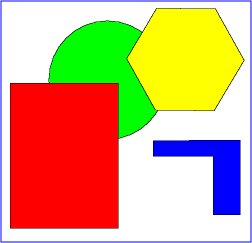
|
Notes
Avoid paragraphs in the list of imagemap areas: Using paragraph markup (two linebreaks in succession = an empty line) causes the HTML output of the script to be non-conformal with XHML 1.0 and might cause the map to work improperly in some browsers.
Conflict with LineBreaks: If you configured your wiki to honor line breaks (new lines) then you need to put before the (:imgmap:) markup (:nolinebreaks:) and after (:imgmapend:) put (:linebreaks:).
Show image at original size: Don't use the width= or other scaling of the original image
Releases
- 2022-06-23: update for PHP 8 (requested by H.-Jürgen Godau); refactor code; allow for https links, and for links to pages to work without the group. (by Petko)
- 2017-06-17: changed markup for PHP 7.2 compatibility
- 2015-07-11: PHP 5.5 compatibility update (thanks, Petko!)
- 2006-10-28: Added
$RecipeInfo - 2006-08-16: bugfix for http:// and anchor #anchorname links.
See Also
Contributors
Comments
See discussion at ImageMap-Talk
User notes +2: If you use, used or reviewed this recipe, you can add your name. These statistics appear in the Cookbook listings and will help newcomers browsing through the wiki.